OTHERSCONTENT

Custom Search

Tuesday, 16 July 2013

DoubleClick Search: DS features in June

DoubleClick Search: DS features in JuneIn June, we added the following feature in DoubleClick Search (DS):

  • Automatically create inventory campaigns: As we described in an earlier blog post, DS can now automatically create and optimize campaigns covering deep inventory items. DS will automatically create ad groups, ads, and keywords based on the settings you provide. These campaigns will cover even the deepest catalogs with a few clicks.

We also made the following feature updates:

  • ROI bid strategies now optimize on fresher data: Bid strategies with a target metric of CPA, ERS, or ROAS now use fresher conversion data to optimize bids. This improvement brings the power of instant conversions to bid strategies:
    • The conversion data is now fresh within a matter of minutes.
    • The fresher data allows us to fully consider conversion changes for each of the four times a day we change bids.
With these updates, we can now respond even more quickly and effectively to changes in bid strategy performance. The bids are a more up-to-date, accurate, and effective use of your budget.

  • New operations for Formula columns: When creating an equation for a Formula column, there are three new available operations:
    • Round(x): Rounds x to the nearest integer. For example: Round(1.4) = 1
    • Floor(x): Returns the greatest integer less than x. For example: Floor(1.6) = 1
    • Ceiling(x): Returns the smallest integer greater than x. For example: Ceiling(1.4) = 2.

  • New Google Analytics columns: The following are now available as selectable columns. These percentage metrics make it easier for you to connect your Google Analytics metrics to visits:
    • GA goal completions/visit
    • GA goal value/visit
    • GA revenue/visit
    • GA transactions/visit

In addition, we made a number of updates to the overall speed and usability of DS. These updates also lay the groundwork for the exciting new features we’ll be launching in the coming months. Updates include (see a full list here):

  • Can now name a scheduled edit, which will appear in the Name column on the Scheduled edits page.

  • For scheduled edits and rules, we’ll no longer send an email notifying you that the edit/rule has started. You’ll be able to see the start time in the email we send when the edit/rule is complete.

  • Reduced the load time of the campaign management pages in the UI, in particular for pages with a large amount of rows.

  • Nested substitute functions are now supported in inventory management. Example: [SUBSTITUTE(SUBSTITUTE(GTIN, "2", "B"), "1", "A")].

DoubleClick Search: More flexible reporting in DoubleClick Search with...

DoubleClick Search: More flexible reporting in DoubleClick Search with...Have you ever wanted to quickly figure out which of your campaigns perform the best on mobile devices? How about which day of the week tends to give you the most efficient CPA? To answer these questions and many more, we are happy to announce DoubleClick Search reporting Dimensions -- a great way to get fast insights from your search performance data, and now live for all clients.
Dimensions allow you to view your performance data independent of the reporting hierarchies that exist across different search engines, enabling you to look at your metrics through a variety of different lenses.

Using dimensions, you can:
  • Group your search performance data by day of the week, week, or month of the year
  • Group your campaign data by various attributes -- such as campaign or ad group name or device type
  • Compare performance across various engine types or match types.


Getting Started

Here’s how to get started with the new capabilities.
1. Sign in to DoubleClick Search and find the new Dimensions tab.

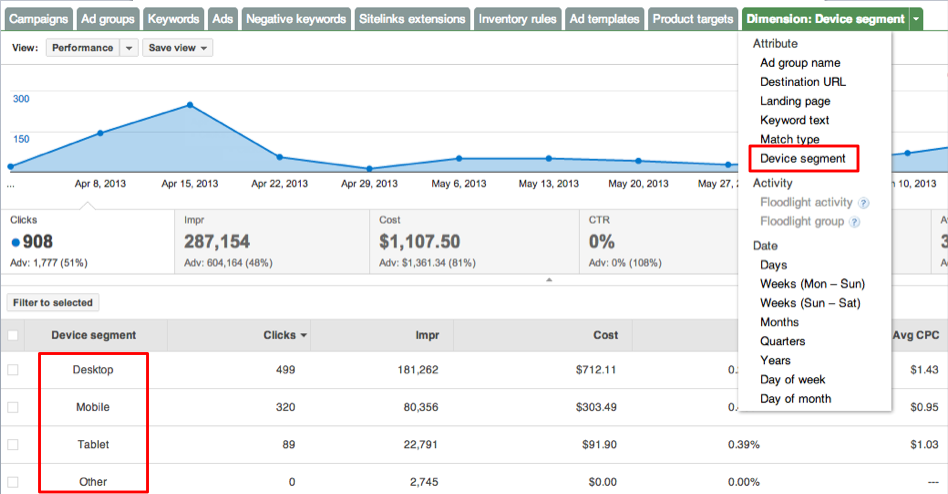
2. Select a Dimension to group your data by. Since AdWords enhanced campaigns now support cross-device campaigns, it’s often interesting to compare performance across the various device types.

3. We can see that in the case of this demo data, mobile has better performance and a much lower CPC, while tablet falls somewhere in between:

DoubleClick Search: Enhanced campaigns: Report by device type in Doubl...

DoubleClick Search: Enhanced campaigns: Report by device type in Doubl...Back in February, we introduced our upgrade tools as a faster, easier way to transition you to AdWords enhanced campaigns. But in addition to powerful upgrade tools, you told us you’re also looking for better measurement, to surface deeper insights and make smarter decisions in a constantly connected world.
Today, we’re excited to announce reporting by device type in DoubleClick Search, available to all advertisers, which allows you to see how your campaigns, ad groups, ads, or keywords are performing by device type. With this new reporting feature, you can quickly compare how any aspect of your campaign is performing on desktop computers, mobile devices, and tablets.


You can use one of two flexible reporting features to see detailed metrics by device type: Dimensions or Segmentation. Using a dimension is best if you want to view device data for a single account, campaign or ad group, while segmentation provides device reporting across multiple accounts, campaigns or ad groups.

Our reporting by device solution allows you to:
  • Report on historical data back to January 1, 2013, including both device segmented engine and conversion statistics.
  • View segmented data at all scopes, from the advertiser level all the way down to individual keywords, to inform your decisions with more granular data.
  • Support segmented data for formula columns that reference Floodlight and engine data.

In addition to performance stats across devices, DoubleClick Search allows you to measure your search marketing alongside other digital marketing channels and website analytics -- ensuring you get a holistic view of your online marketing performance.

Inside AdWords: Free Course On Creating Your First Online Campaign...

Inside AdWords: Free Course On Creating Your First Online Campaign...Want to reach potential customers online, but not sure how? We’ve got good news. Starting July 22, the AdWords Guides to Success Team will be offering Marketing 101, our first-ever massive open online course (MOOC). Register now.


The free course is for businesses who haven’t yet started advertising online or are just learning how it works. Over the course of three weeks, the class will help you understand the basics of online advertising, how it can help your business, and prepare you to start an online advertising campaign with AdWords.

Course highlights include:
  • Help thinking about your potential customers and business goals, and how to translate those goals to an online advertising campaign
  • Examples of businesses that can use online advertising
  • Interactive office hours with AdWords experts and opportunities to connect with other students
The course will also offer videos, quizzes, a worksheet, and links to additional resources and help. Here are the details:
  • What: Marketing 101, a massive open online course
  • Audience: New advertisers
  • When: July 22 - August 9
  • Requirements: Email address and a computer

Inside AdWords: Learn how to bid like a pro with new whitepaper an...

Inside AdWords: Learn how to bid like a pro with new whitepaper an...People are constantly connected, switching seamlessly between devices to shop, communicate and stay entertained.Research shows that people now use as many as three devices combinations every day including desktop computers, laptops, phones, tablets, "phablets", web-enabled TVs, and more.

This always-on, multi-device world has dramatically changed user behavior and also presents exciting, new opportunities for online marketers. With AdWords enhanced campaigns, you can now present users with more relevant messages than ever by taking into account contextual information such as a user’s location, device, and the time of day.

Bid adjustments in enhanced campaigns are key to optimizing for these signals.  To help you master bid adjustments and drive better performance, we published a whitepaper, Bid Like a Pro: Strategies for Success in AdWords Enhanced Campaigns where you’ll find the following:
  • Tips for prioritizing bid adjustments based on your business goals
  • Best practices for setting bids by device, location, and time
  • Suggestions for how to integrate more automation into your AdWords strategies
  • Success stories highlighting advertisers’ improved results
You can download the the whitepaper here.

Tune into the webinar 7/11

To learn more about bidding and search strategies, join us on Thursday, 7/11 at 10am PDT for a webinar highlighting bid adjustment best practices and optimization techniques to get the most out of your search campaigns. Bhanu Narasimhan, Product Manager and Ting Zhang, Search Solutions Manager will be hosting.  Register here.

Inside AdWords: Google Catalogs in Lightbox -- a scalable way to ...

Inside AdWords: Google Catalogs in Lightbox -- a scalable way to ...Google’s Lightbox ad format -- a part of the Engagement Ads family, which consists of interactive ad formats that let advertisers create and scale brand messages across the web, while only paying when a user engages with the ad -- has seen a great deal of momentum since its launch in March.

Today we are announcing a brand new capability within this format – Google Catalogs in Lightbox.

Brands invest heavily in creating beautiful stories in their printed catalogs, and we want to make it easy for our users to connect with relevant, digitized versions of these catalogs around the web. With Google Catalogs in Lightbox, users can easily flip through the digital catalogs, to see the latest product selections, check product prices, and visit product pages without ever leaving the original page they were browsing. Advertisers pay on a Cost-per-Engagement (CPE) basis -- meaning that they pay when a user chooses to read their catalog. And with access to metrics like page flips and product views, advertisers have more customer insight than ever before.

We have received positive feedback on this format from users, advertisers and publishers. Users have responded well to the beautiful, immersive catalog experience. Advertisers have found it easy to create online catalogs within hours, using their existing PDFs and Google Merchant Center feeds. And finally, our publisher partners that have run Lightbox formats have seen their CPMs as much as double.

One of our beta partners, Brand USA, an organization that promotes international tourism to the United States, used Google Catalogs in Lightbox to showcase an interactive US travel guide to Canadian tourists. They digitized their existing print tourism guide and achieved massive distribution of their catalog online, reaching a fifth of the Canadian population, and actively engaging 1 in 40 Canadians.


To get started, including help with digitizing your catalog, contact your account team today.

Posted by James Beser, Sr. Product Manager